

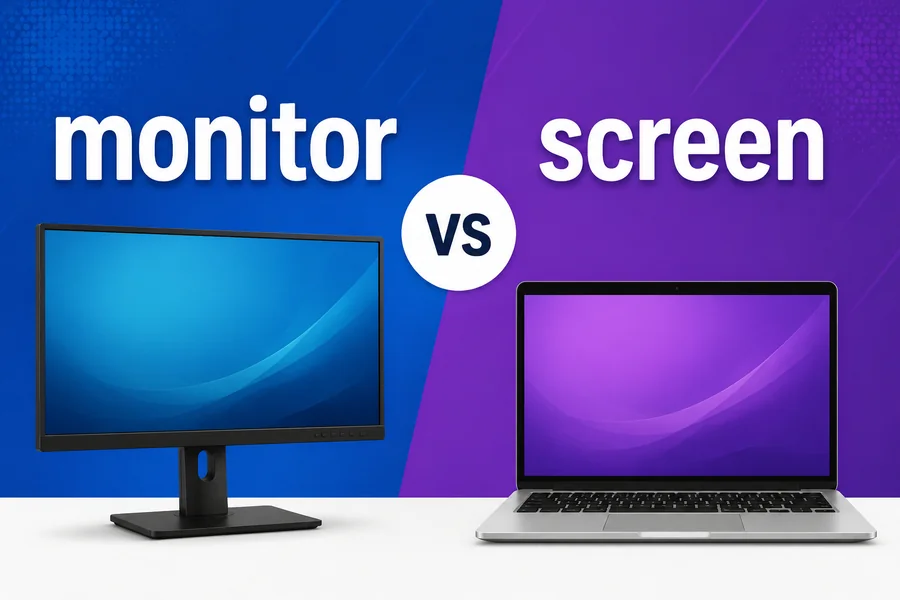
There is some overlap between the use of monitor vs screen in everyday usage, which can be the source of confusion between the two words. However, they are not the same. A monitor is a display that includes all the components, and a screen is the surface where it is displayed.
Avoid writing or shopping mistakes and avoid making mistakes in tech support conversations by understanding screen vs monitor. Using the wrong word can change the meaning of a sentence. This gives you a clear understanding of both words, and you can accurately describe hardware and displays.
This guide to monitor vs screen defines the difference between these two terms and how to use them correctly. Examples, common mistakes, and tips will help you to understand these words in everyday and technical contexts.
Define “monitor.”
Monitor: A standalone display that is plugged into a computer using a cable or wireless connection. It comprises the screen panel, casing, stand, ports, and inbuilt hardware for handling the video signal.
Furthermore, a monitor is a full product that can be purchased, disconnected, and transferred from place to place. For instance, a desktop setup could involve connecting a 27-inch external monitor via DisplayPort or HDMI, while that 27-inch monitor has everything necessary to display an image.
Define “screen.”
A screen is a flat surface on which you can see things like pictures, words, and videos. It’s a part of a device, not the device itself. All phones, laptops, TVs, smartwatches, and monitors have a screen.
Furthermore, a screen is also the panel technology, like LCD, OLED, or LED. For instance, you could break your phone, and the phone still functions; that’s only one part of the phone.
Read Also: Fare Better or Fair Better
Monitor vs Screen: Quick Comparison Table
All monitors have a screen, but not all screens are monitors. It is a screen; it is not a monitor.
| Feature | Monitor | Screen |
| Definition | A complete external display device | The surface that displays the image |
| Scope | Whole unit with ports, stand, and casing | One component inside a device |
| Found in | Desktop setups, offices, gaming rigs | Phones, laptops, TVs, watches, monitors |
| Can it work alone? | Yes, when connected to a video source | No, it needs a device around it |
| Example | “I bought a 27-inch monitor for my PC.” | “My laptop screen has a dead pixel.” |
How To Properly Use monitor vs screen In A Sentence
Use the monitor and screen appropriately – always look at what you are pointing at. “Monitor” means the whole display device, and “screen” means the viewing screen; your sentences describe the problem with the hardware or display very clearly and accurately.
How To Use “Monitor” in a Sentence
Use a monitor for the entire external display as a product or device. It’s appropriate for discussing setups, purchases, connections, or hardware. Office work, gaming, video editing, etc., typically require a second monitor or dual monitor setup.
- I added a second monitor to my laptop to work with.
- This monitor has a 144Hz refresh rate and two HDMI ports.
- She switched off the computer when she left her desk.
When using a monitor, more than likely the reader understands that you’re referring to the entire device, including the monitor screen, stand, and ports. With the use of “monitor,” you’re communicating to the reader that you are talking about the entire monitor, including the monitor screen, stand, and ports—even in casual contexts, there is a clear intention to refer to the whole.
How To Use Screen In A Sentence
The display surface of any device is referred to as a screen. It’s frequently used in brightness sentences, resolution sentences, damage sentences, screen time sentences, or sentences that describe what’s currently on the screen.
- My phone screen was broken when the phone fell to the ground.
- Reduce brightness to conserve battery life.
- A message of error was displayed on the screen.
Taking screenshots correctly indicates to readers your screen, rather than the full device, is the source of any issues, settings, or content.
More Examples Of Monitor Vs Screen Used In Sentences
It is quite evident from the examples that there is a difference between monitor vs screen. Use “monitor” for the entire display device and “screen” for the screen you’re looking at, which can help when describing the setup for hardware or the problem with the display.
Examples Of Using “Monitor” in a Sentence
- He got a curved monitor for his games.
- The office provided all staff with a second monitor.
- It is a 4K at 60Hz monitor.
- She set up the monitor on an adjustable arm.
- I had a problem with my monitor that I couldn’t get to go on, so I went to the power cable.
- The designer used her monitor to set the color correctly.
- The meeting was held on an external monitor connected to the laptop.
- It’s easier to read long documents on a vertical monitor.
- After 10 minutes the monitor went into sleep mode.
- His new monitor has integrated speakers, and there’s a USB hub.
Examples Of Using “Screen” in a Sentence
- The screen of the tablet is prone to scratching without a protector.
- The screen appeared to have smudges that caused difficulty in reading the text.
- It was a spectacular film on the big screen.
- When the charger is connected to her laptop, her laptop screen flickers.
- It is recommended to watch less television before retiring to bed.
- The ATM screen went blank during the process.
- He printed a screenshot of the error on his screen.
- Power-saving: Phone screen remains dark when making calls.
- The light from the sun was blinding.
- By holding up your wrist, the smartwatch screen turns on.
Common Mistakes To Avoid
Many find it hard to distinguish between monitor and screen, often using “monitor” when they intend to use “screen” or the other way around. When you are asked about the whole device or just the surface, it is important to make sure that you make a clear distinction between the two so that your sentences describe hardware or visuals.
Mistake #1: Using “Monitor” When You Mean “Screen”
One of the most frequent errors is to mix up monitor and screen. For instance, the statement ‘my phone monitor cracked’ is wrong since phones have no monitors. They have built-in screens.
Instead, use “screen” when referring to the screen (display surface) that is found on phones, laptops, tablets, or TVs. This helps to keep your sentence accurate and prevent adding an external device.
Always check the device before writing. A monitor is a standalone display unit, and a screen is the surface of the display unit. The right word makes it easier to understand what you’re talking about in product descriptions, customer service, and general writing.
Mistake #2: Using “Screen” When You Mean “Monitor”
The other common error is using screen instead of the external device as a whole. For instance, shopping for a new screen for your desktop is a very general statement. A repair shop may believe you should get a new monitor instead of a repair panel.
Always think about what you’re purchasing or describing. The display screen or panel is known as the screen, whereas the entire unit with ports, a stand, a case, etc. is called the monitor. Proper use eliminates confusion while shopping, repairing, and technical writing.
Tips For Avoiding These Mistakes
Avoid using the words “monitor vs screen” interchangeably. Make sure you know their meaning and only use the appropriate term to describe a full monitor or screen of the display.
- Keep in mind the following: Not every screen is a monitor, but every monitor has a screen.
- Is the item battery-operated and portable? If yes, it is a monitor.
- Leverage screens for built-in displays on phones, laptops, tablets, and TVs.
Context matters.
There is context to choose the right word. The points are monitored by the monitor, and they are viewed by the screen. The right word is the right word for resolving tech setups, repairs, and display settings.
Monitor
When it comes to desktop setups, hardware buying, and connections, a monitor is a crucial part of the discussion. It indicates to the listener that you’re talking about a different, complete machine, no matter what, with its own power source and inlets.
Also, a monitor is used in the work and games environment. For example, a remote employee might want to see a second monitor, and a gamer might want to compare refresh rates of two models.
Examples of “monitor” in various situations:
- In office/gaming environments, the monitor is the complete external screen.
- It encompasses the panel, stand, ports and internal parts all at the same time.
- The proper use of a monitor enhances the clarity of the purchase and tech support.
Screen
“Screen” refers to the area that is visible on any device. It is frequently used in phrases relating to image quality, damage, settings, or content, both on phones, laptops, TVs, and monitors.
Furthermore, a screen is not just an apparatus. How versatile and adaptable the word “screen” is in everyday speech when people discuss screen time, screen sharing, screenshots, and the big screen.
In different situations, ‘screen’ means the following:
- A screen is the surface that phones, laptops, TVs, and monitors display on.
- It can be seen in phrases such as “screen time,” “screenshot,” and “screen brightness.
- When used correctly, it can help to explain writing problems and settings.
Understanding the screen will help you be clear on panels’, pictures’, and/or screens’ behavior. When used properly, it will distinguish it from a monitor, and your writing will be precise in formal and informal situations.
Exceptions To The Rules
The distinction between monitor vs screen has a definite rule, and there are some exceptions. People frequently use the term “screen” for a display screen, and in some contexts, such as in certain industries, “monitor” is used for something other than a computer display.
Likewise, the terms of a touch-screen monitor or baby monitor become confusing. Knowing them will help you utilize both words correctly without appearing too strict.
Monitor
- Baby Monitor: An audio or video device that allows parents to keep an eye or ear on a child in another room. In this context, “monitor” means to observe, rather than to view on a computer screen.
- Heart Monitor: A heart monitor in a hospital or wearables to monitor a patient’s heart. Again, the word “monitor” hints at the act of monitoring and observing, not a monitor on a desktop.
Screen
A screen is not just for display panels! In other sentences, it can refer to the process of filtering or checking; again, this is not a term for computer hardware.
- Screening Calls: These are calls that are screened, which means that the person decides which calls to answer. There is no display surface, but the term “screen” is appropriate.
- Movie screen: A screen that displays a movie but doesn’t have electronics in it. A blank screen that isn’t attached to a monitor or powered device.
These uses are known to ensure clear communication in medical, entertainment, and day-to-day contexts. “Proper use” indicates that you are referring to a display surface, tracking device, or filtering action.
Readers will be able to identify instances in which the typical hardware rules don’t fit the situation with a baby monitor and movie screen, enabling them to write precisely and flexibly as well.
Read Also: Afterward or Afterwards
Practice Exercises
Use practice exercises to practice monitor vs screen. Fill-in-the-blanks, sentence writing, and multiple-choice exercises reinforce your knowledge of display devices and viewing surfaces, enhancing your ability to use them correctly in technology, at work, and in everyday situations.
Exercise 1: Fill In The Blank
Fill in the blanks with the correct word: monitor vs screen.
- My laptop __________ cracked after I dropped my bag.
- He connected a second __________ to his desktop for editing videos.
- Reduce your __________ time at night to sleep better.
- The new __________ on her desk has a 165Hz refresh rate.
- An error code flashed on the ATM __________.
Answer Key:
- screen
- monitor
- screen
- monitor
- screen
Exercise 2: Sentence Writing
Write a sentence using each of the following words correctly:
| Word | Example Sentence |
| monitor | She bought a 32-inch monitor for her home office setup. |
| screen | The phone screen went black after the update. |
| monitor | The gamer connected his console to a high-refresh monitor. |
| screen | Dust on the screen made the colors look faded. |
| monitor | The IT team replaced every old monitor in the building. |
Exercise 3: Multiple Choice
Choose the correct word (monitor or screen) for each sentence.
- The ________ is the full external display device with ports and a stand.
- A) Screen
- B) Monitor
- A cracked phone display is a damaged ________.
- A) Monitor
- B) Screen
- He mounted his second ________ on the wall above his desk.
- A) Screen
- B) Monitor
- Doctors suggest limiting ________ time for young children.
- A) Monitor
- B) Screen
- The office ordered ten new ________ units for the design team.
- A) Screen
- B) Monitor
Answer Key:
- Monitor
- Screen
- Monitor
- Screen
- Monitor
People Also Ask (PAA)
| Question | Short Answer |
| Is a monitor the same as a screen? | No. A monitor is a complete external display device, while a screen is only the surface showing the image. |
| Can a TV be used as a monitor? | Yes. Most modern TVs connect to computers through HDMI and work as monitors, though input lag may be higher. |
| Is a laptop display a monitor or a screen? | It is a screen. A laptop display is built in, so it is not a standalone monitor device. |
| Why is it called a monitor? | The name comes from monitoring computer output. Early displays let operators watch and check what the machine produced. |
| Does every monitor have a screen? | Yes. Every monitor contains a screen, but many screens, like phone displays, do not belong to any monitor. |
Conclusion
Knowing the difference between monitor vs screen is crucial for the sake of communication. A monitor is the device that displays everything; a screen is what you look at on phones, laptops, TVs, and monitors. A misused word can lead to misunderstandings for readers or to a repair shop.
Use fill-in-the-blanks, sentence building, and multiple-choice tests to reinforce the difference and employ these words appropriately. Keep in mind that the advice is to use “monitor” for the entire device and “screen” for the screen that displays the image. When you use them properly, you can maintain the accurate use of writing in tech support, shopping, and everyday conversations.
Read Also: How to Spell Untill
FAQs
What’s the difference between a monitor vs screen?
A monitor is a standalone display device with ports and a stand; a screen is the surface that displays the image on any device.
When should I use a monitor?
Monitor for describing the whole process of an external display device, e.g., purchasing, connecting, mounting, or troubleshooting a desktop display device.
When to use “screen” in a sentence?
When referring to the display surface, image area, or panel on phones, laptops, TVs, watches, or monitors, use the word “screen.”
Is it possible to use the word screen, when you are talking about monitors?
In casual conversation, people sometimes refer to a monitor as a screen; however, for technical writing or repairs, use the term “monitor.”
How to avoid using the words “monitor” and “screen” interchangeably?
Query whether this is an independent device. If yes, indicate the monitor. If it is only the display surface, then say screen.