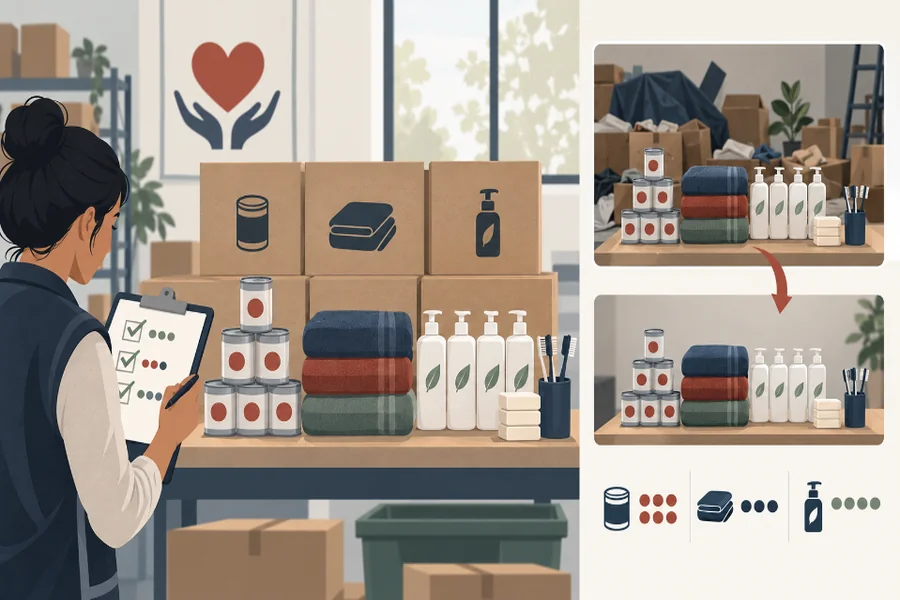
A donation drive can accidentally advertise more help than it has collected. A cleaned photograph duplicates a stack of tins, fills an empty corner with blankets or turns a few hygiene packs into a full table. The result looks generous, but families and partner groups may use it to understand what is actually available.
Before using an AI Photo Editor, separate presentation cleanup from inventory evidence. A tidier wall or removed cable may improve the image. Adding, enlarging or hiding donated goods changes the record.
Give PicEditor AI a counted source photograph and a specific request about the surroundings. The inventory provides an external check on the AI Photo Editor result: the packages in the edited scene must still correspond to the goods on the table.
Find The Quantity Claim Hidden In The Photograph
A campaign photograph makes claims even without numbers in the caption. A full pallet suggests a different capacity from three boxes. Identical bags may look like prepared family kits. Rows of medicine may imply items the organization is qualified to distribute. List those impressions before editing.
Decide Whether The Image Is Evidence Or Illustration
An evidence image documents a particular collection at a particular time. An illustration communicates a general category of support. Do not let one file serve both roles without a label. A staged stock image may be suitable for a general appeal, but it should not be captioned as the result of yesterday’s local drive.
Ask what a donor, recipient or partner would reasonably infer. If the post says “ready for distribution,” the visible quantities matter. If it asks for winter coats generally, a clearly identified illustration may carry less inventory meaning. The intended use sets the editing boundary.
Protect Sensitive Context Without Falsifying The Stock. Privacy may require removing a face, address label or identifying document. Make that change separately and record it. Cropping a recipient is different from cropping out half-empty shelves to make the room look full. Protect people without creating a misleading account of supplies.
Consider photographing supplies before recipients enter the room. That may solve the privacy problem without reconstructing a person-shaped gap. If an existing image is the only record, use a visible blur, crop or neutral mask when appropriate rather than generating shelves that never appeared behind the person. The edit should be easy for the organization to explain.
Record The Real Inventory Before Cleanup
Count the visible categories while the goods are still arranged. Use units meaningful to the drive: sealed cartons, individual tins, blankets, complete hygiene kits or unpacked components. Photograph labels or packing lists for internal reference, but do not publish private donor information.
| Image area | Inventory fact | Editing boundary |
| Food cartons | Count and sealed status | No duplication or resizing |
| Blanket stack | Visible folded units | Keep stack height |
| Hygiene kits | Complete or incomplete | Do not fill gaps |
| Room background | Not inventory | Remove minor clutter |
| Personal label | Private information | Mask and disclose internally |
Keep Wide And Close Source Photographs Together
Keep a wide image of the whole room and close views of each category. The wide view preserves overall scale; close views help verify counts. Name the files by date and location. If goods arrive later, photograph them as another batch rather than blending two moments into one seamless scene.
PicEditor AI candidates should always remain linked to this contact sheet. A reviewer needs the unedited arrangement nearby, not a memory of how the table looked before it was cleared.
Clean The Surroundings Without Expanding The Donation
Write a narrow request around non-inventory clutter: remove one loose cable from the floor, simplify an empty wall, or soften a distracting reflection. State that every box, bag and item edge must remain unchanged. Generate a small number of candidates so comparison stays manageable.
Watch For Plausible Duplication. Repeated packages are easy to duplicate invisibly. Inspect logos, creases and shadows for cloned patterns. Count partially hidden items as carefully as complete ones. An extra corner behind a box can make viewers perceive another carton even when the candidate does not contain a perfect copy.
A pic editor AI result may also resize the table or alter perspective, making the same goods appear more plentiful. For this pic editor AI comparison, overlay the candidate on the source in a separate editing application. Compare shelf uprights, floor tiles and carton dimensions before approving the composition.
Keep Packaging And Condition Accurate. Do not repair crushed corners, torn labels or opened packaging if those conditions affect distribution. A brighter image is acceptable only when it does not make a damaged item appear sealed. When quality checks are still pending, say so instead of polishing the uncertainty away.
Recount The Edited Image Against The Inventory
Review by category, not by overall attractiveness. Start at the top left and move in a fixed path. Mark each visible unit on a transparent layer, then compare the tally with the pre-edit inventory. Repeat the process with a second reviewer who did not guide the edit.
Test The Crop Used On The Actual Platform
A square crop may remove empty space and make the collection look denser. A narrow story crop may hide the final carton or the sign explaining that goods are examples. Export the exact social crop, then recount and reread the caption in that context.
Check thumbnails as well. When individual items merge into one block, viewers may estimate quantity from area rather than count. Use a wider shot or a factual caption if the small version creates an exaggerated impression.
Resolve Every Difference Before Posting. If the candidate count differs, reject it or isolate the cause. Do not repair one duplicated tin by painting over it without repeating the review; that second edit can alter another package. A simple original with a modest background is better than an elaborate image that cannot be reconciled.
Publish A Dated Caption With The Verified Picture
PicEditor AI is useful when a nonprofit already has an accurate record and needs restrained presentation cleanup. It is not an inventory system and should not determine what the organization can promise to distribute.
Write the collection date, location and scope in the caption. Distinguish goods collected from goods still requested, and avoid implying that every pictured item forms one complete kit unless that is true. If supplies move quickly, direct readers to a current list.
Keep fundraising totals separate from visible item counts. A photograph of donated goods cannot prove their financial value, and a campaign total may include transport, storage or cash contributions outside the frame. Let the image show the verified collection while the accompanying report explains broader figures from the organization’s records.
Archive the source photographs, inventory sheet, edit instruction, accepted candidate and recount marks together. Future reports can then show how the published image was made. Honest donation photography does not need to make a small drive look large; it needs to show clearly what people contributed and what the organization can actually use.