A short explainer often becomes confusing before it becomes long. The writer tries to fit a definition, a mechanism, a benefit, and a warning into the same ten seconds. The visuals respond with unrelated motion, while the voice-over keeps introducing ideas the viewer has no time to connect. More animation does not repair that overload. The sequence needs a smaller unit of thought.
An AI video editor can help when the brief names one visible event for each concept. AIVideoEditor.me asks for a descriptive prompt and a model choice, then returns a generated clip for review. That workflow is useful for explainers only if the editor decides what the shot must prove before selecting a visual style or model.
Turn Each Concept Into One Visible Change
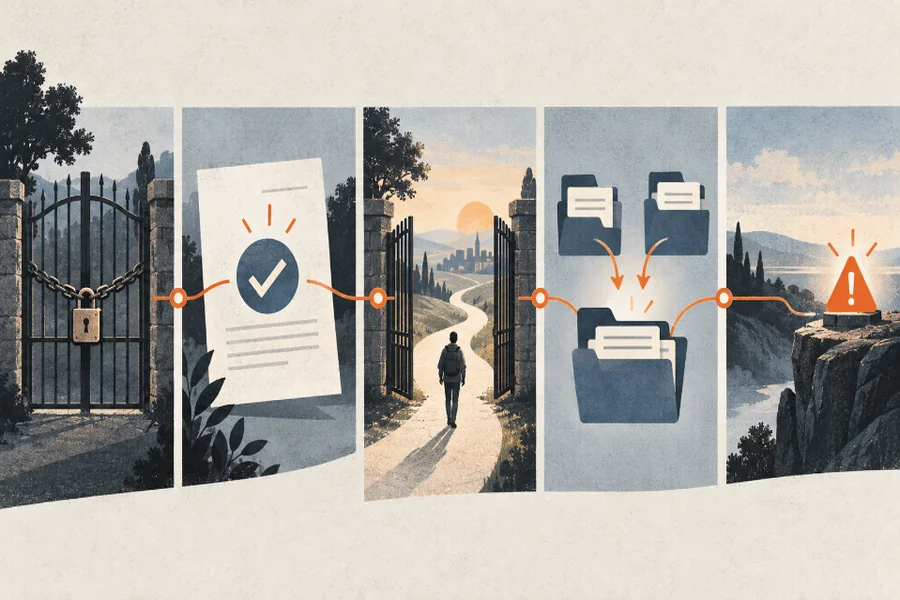
Write the lesson as a short chain of claims. Under each claim, describe one action a silent viewer could observe: a blocked path opens, two separate files merge, or a meter moves after an input changes. Avoid abstract prompts such as “show efficiency” or “visualize innovation.” They invite decoration rather than explanation.
Make A Concept To Event Ledger
Use four columns: concept, visible event, protected detail, and fail signal. The protected detail keeps the viewer oriented from one shot to the next. The fail signal states what would make the animation teach the wrong idea. A lock opening can represent access; a lock dissolving may imply the control disappeared entirely. That distinction belongs in the brief.
| Concept | Visible event | Protect | Reject when |
| Access granted | One gate opens | User and gate position | All gates vanish |
| Files combined | Two cards join one folder | Both source colors | A source disappears |
| Alert triggered | Meter crosses a line | Threshold position | Needle moves backward |
The ledger gives reviewers something firmer than “the shot feels clear.” It also stops the narration from carrying logic the image contradicts.
Read the ledger aloud with the script beside it. Every narrated verb should have a visual counterpart, and every visual change should earn a sentence or a deliberate pause. If the voice says a request is checked before approval, the picture must show that order. Swapping the events may create a smooth clip while teaching the process incorrectly. This quick comparison catches sequencing errors before they become expensive animation notes.
Keep One Shot Responsible For One Claim
If a shot must explain both why a system exists and how it works, split it. The first shot can establish the blocked path; the second can show the permission event. Reusing the same object and camera direction keeps the split from feeling like a topic change. AIVideoEditor.me offers several generation routes, but the shot’s explanatory purpose should remain stable across them.
Give each shot a short label based on its job rather than its look: blocked, checked, opened, combined, or alerted. Those labels make it easier to reorder a rough cut without losing the lesson. They also prevent a reviewer from approving a beautiful clip that duplicates the previous shot instead of advancing the chain.
Use Three Steps To Build The Sequence
Begin with the claim ledger, move to a neutral key frame, then request motion. This order reduces the number of decisions made inside the video prompt. It also creates checkpoints where a subject expert can correct the lesson before the team spends credits on several attractive but misleading clips.
Step One Approves The Static Relationship
Create or select a still that contains only the objects needed for the concept. Check scale, labels outside the generated image, direction, and hierarchy. A complicated scene usually hides the relationship under review. If the relationship is unclear while nothing moves, motion will make it harder to inspect.
Ask a subject expert to approve this still before the motion pass. Their task is narrow: confirm that the objects, order, and relationship are correct. Color grade and camera flair can wait. A signed-off key frame becomes a stable reference when later versions drift, and it gives the editor a defensible reason to reject an attractive alternate that changes the mechanism.
Step Two Describes One Observable Motion
Write movement as a camera or action note: the left card slides into the folder while the right card stays fixed. Protect object count, color, and layout. The prompt should not introduce a new environment, character, or metaphor. When you edit videos online, keep the requested motion within this brief rather than rewriting the lesson during generation.
Step Three Compares Output With The Ledger
Watch once for meaning, then frame by frame for geometry. Mark the first moment when the action becomes ambiguous. A clip can begin correctly and end with an extra object, reversed direction, or collapsed relationship. Reject the shot at that moment instead of averaging a good opening with a wrong ending.
Check The Sequence Without Narration First
Mute the draft and ask a reviewer to describe the change in each shot. Their wording does not have to match the script, but the cause and result should. Then play the narration and note where it races ahead of the picture or repeats information the image already supplies.
Remove Any Motion That Teaches Nothing
Camera drift, floating particles, and constant object pulses can make a simple explanation feel busy. Keep a movement only when it guides attention or demonstrates the claim. AIVideoEditor.me offers access to several generation models, yet model variety should not become visual noise. The clearest route often holds the camera still and lets one event carry the shot.
Keep Exact Terms In Editable Overlays
Product names, equations, dates, and policy language should remain conventional text layers when accuracy matters. Generated video can carry the mechanism beneath them. This division lets the team correct wording without regenerating the scene and prevents a visually plausible misspelling from becoming part of the lesson.
Finish with a two-pass review. In the first pass, a newcomer explains the mechanism without seeing the script. In the second, the subject expert checks order, terminology, and exceptions. Agreement between those two viewers is more useful than a general request for added polish: one confirms comprehension, while the other protects accuracy. Save their notes against the shot labels so the next revision changes a specific event instead of reopening the entire video.
Before export, number every shot and keep the ledger with the editing timeline. If a late trim removes the event that supports a claim, the gap becomes visible immediately. This final traceability check is simple, but it prevents pacing changes from silently breaking an explanation that passed an earlier review.
Ship The Clip That Teaches One Clean Chain
AIVideoEditor.me fits educators and product teams that can define visible events before asking for motion. It is less useful when the lesson itself remains unsettled or when a generated scene is expected to prove a real measurement.
Keep one claim per shot, protect the object relationship, and test the cut in silence. A short sequence built this way gives the narration room to explain rather than rescue, and it leaves the viewer with a mechanism they can repeat in their own words.