I had seen plenty of AI-generated videos online, but I never really understood how people were making them.
One day, I decided to experiment with an old photo of mine. I wasn’t looking to create anything professional. I simply wanted to see whether AI could turn an ordinary picture into a short, entertaining video.
What started as a quick experiment ended up being much more interesting than I expected.
I Started With a Single Photo
I chose a clear photo with the person facing the camera. I quickly discovered that the quality of the original image makes a big difference.
A blurry image or a face hidden at an unusual angle didn’t produce the same results. When I switched to a sharper photo with a clearly visible face, the animation looked considerably better.
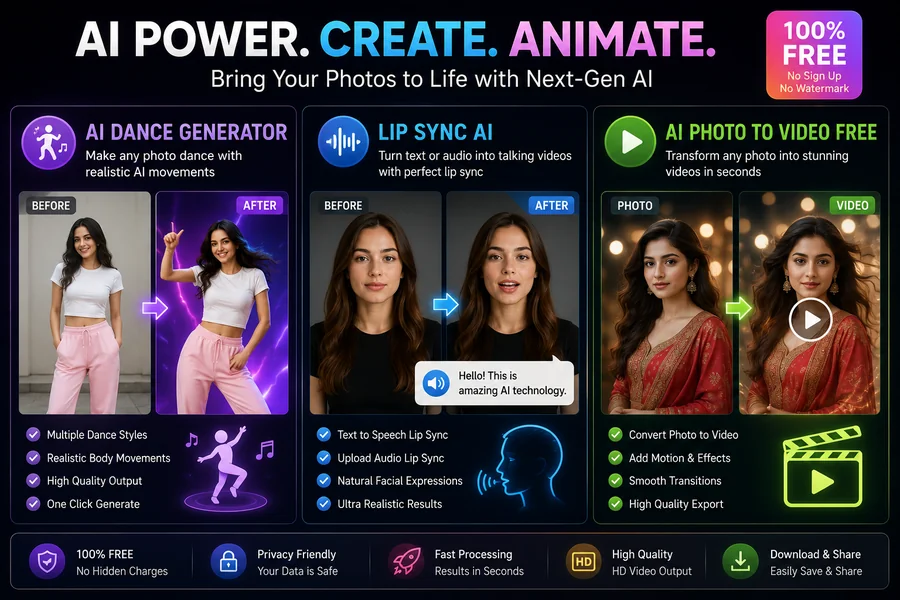
I then tried an AI photo to video free tool to see how easily I could turn the still image into a moving clip.
The process was surprisingly straightforward.
I uploaded the picture, selected the type of animation I wanted, and let the AI process it. Within a short time, I had a video instead of a completely static image.
My First Dance Experiment
After seeing the basic animation, I wanted something more creative.
That’s when I tried an AI dance generator.
Instead of recording myself or hiring someone to create choreography, I could use the uploaded image as the starting point and let AI generate movement.
The first result wasn’t perfect. Some movements looked slightly unnatural, especially when the original image didn’t provide enough information about the person’s body position.
But the overall concept worked.
A photograph that had been completely still was now moving to a dance sequence.
That was the moment I realized how quickly AI video technology has developed.
Then I Tested Lip Sync AI
After experimenting with dancing, I wanted to try something completely different.
I used lip sync AI to make the person in the image appear to speak.
This was probably the feature that impressed me most.
The system analyzed the dialogue and generated corresponding mouth movements. When the source image was clear and the speech was relatively short, the result looked surprisingly convincing.
It wasn’t perfect in every frame, but the effect was good enough to make the photograph feel almost alive.
What I Learned About Better Results
After testing several images, I started noticing a pattern.
The AI wasn’t necessarily the problem when a result looked strange. Often, the source image wasn’t suitable.
I got better results when:
- The face was clearly visible.
- The image had good lighting.
- The subject was facing the camera.
- The photo wasn’t heavily edited.
- The original image had good resolution.
- The animation or dialogue wasn’t excessively long.
These details may sound minor, but they made a noticeable difference in my experiments.
Where I Could Actually Use This Technology
At first, I thought these tools were mostly for fun.
Now I can see several practical uses.
Content creators could turn photographs into short social media clips. Businesses could create simple promotional visuals without recording every video from scratch. Someone creating a presentation could animate a character or portrait instead of relying entirely on static images.
Even personal projects can become more interesting.
For example, an old family photograph could potentially be turned into a short animated memory, provided everyone involved is comfortable with how the image is being used.
What I Liked About AI Photo to Video Tools
The biggest advantage for me was accessibility.
Traditional video creation can require cameras, microphones, editing software, lighting, and plenty of time.
With an AI photo to video free tool, I could start with something I already had—a photograph.
That lowered the barrier considerably.
I didn’t need professional editing skills just to experiment with a basic idea.
The Dance Results Weren’t Always Perfect
I also learned not to expect every generated video to look completely realistic.
Some movements were smooth, while others occasionally looked exaggerated or unnatural. The AI has to estimate body movement from limited visual information, so the quality depends heavily on the source image and the chosen animation.
I think that’s important to remember.
An AI dance generator can save time and make creative experimentation easier, but it doesn’t guarantee professional-quality choreography every time.
My Favorite Part of the Experiment
Interestingly, the technology itself wasn’t the only thing I enjoyed.
I liked the creative freedom.
I could take the same photograph and experiment with completely different results—one version could dance, another could speak, and another could simply have subtle movement.
That made the process feel less like traditional video editing and more like experimenting with ideas.
My Personal Takeaway
Before trying these tools, I assumed creating animated photos would require technical skills.
I was wrong.
The combination of an AI dance generator, lip sync AI, and AI photo to video free tools made it possible to create short videos from a single image with very little manual work.
The results aren’t flawless, and I wouldn’t treat AI-generated movement as a replacement for professional video production in every situation. But for quick creative projects, social content, experiments, and personal ideas, I found the technology surprisingly useful.
Final Thoughts
My experiment started with one simple question: What would happen if I gave AI an ordinary photograph?
The answer was more interesting than I expected.
A still image could become a dancing character, appear to speak, or turn into a short animated video without a camera or complicated editing software.
For me, the biggest appeal is how easy it has become to experiment. With the right photo and a little patience, AI photo to video free tools can turn a static image into something much more engaging, while AI dance generator and lip sync AI features open up even more creative possibilities.
I still prefer to review the final result carefully before sharing it, but as a creative tool, this technology has definitely earned a place in my list of things worth experimenting with.